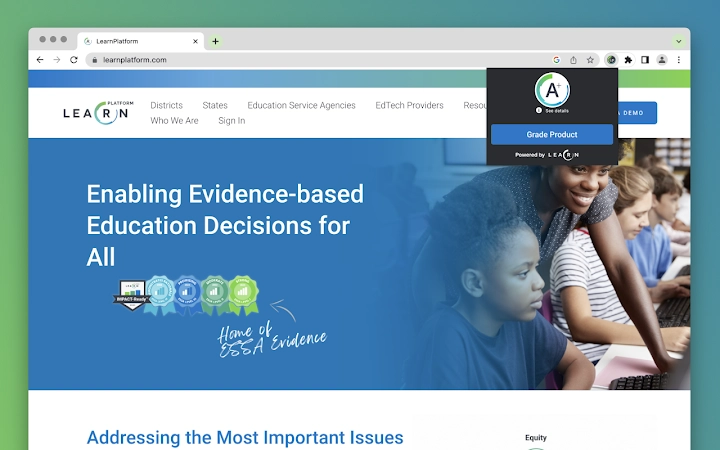

Chrome Extension for Educators: Streamline EdTech Use
Overview
The LearnPlatform for Educators Chrome Extension is designed to support educators in managing their digital learning tools more effectively. It enables teachers and school staff to access real-time insights, product evaluations, and organizational guidance while browsing educational websites. By integrating directly into the browser, the extension provides contextual data about EdTech tools without requiring separate logins or complex workflows. It is intended for use by individual educators, as well as schools and districts implementing a centralized approach to EdTech selection and management.
Target users include K–12 teachers, instructional coaches, technology coordinators, and district administrators. The extension helps solve common challenges such as tool overload, inconsistent product vetting, and lack of data-driven decision-making in technology adoption. Educators can quickly assess whether a tool is recommended, FERPA-compliant, or suitable for younger students—information derived from peer reviews and institutional evaluations.
Real-world usage includes evaluating a new math app during lesson planning, submitting a product request through a district-wide approval system, or building a personal library of trusted tools. The extension operates seamlessly within existing workflows, enhancing productivity without disrupting daily routines. The developer did not provide additional system requirements beyond OS compatibility.
Key Features & Capabilities
- Real-Time Product Grading – Access instant ratings and report cards for educational tools based on feedback from thousands of educators in the LearnCommunity, enabling informed decisions before implementation.
- Personal EdTech Library – Save and organize frequently used or recommended tools in a customizable personal library for quick access and future reference.
- Community Feedback Integration – Engage with a network of educators to ask questions, share experiences, and receive peer insights on specific EdTech platforms.
- Organizational Approval Workflow – For schools and districts, the extension supports a structured request-and-approval process for new tools, ensuring alignment with IT, legal, and pedagogical standards.
- Approved Product Library – Access a centralized, vetted list of tools approved by school or district leadership, including compliance status and usage recommendations.
- Usage Analytics & Monitoring – Track which tools are being used most across classrooms or institutions, supporting data-informed procurement and instructional planning.
These features are particularly useful when selecting tools for classroom use, conducting technology audits, or preparing for district-wide EdTech rollouts. The extension activates automatically when visiting a site in the LearnPlatform library, delivering relevant insights without manual input. It supports both individual and institutional use cases, promoting consistency and transparency in digital learning decisions.
User Interface, Workflow & Performance
The extension features a minimal, browser-integrated UI that appears as a colored icon in the Chrome toolbar. When activated, it displays contextual information about the current website, including a product grade, compliance status, and key metrics. The interface is clean and intuitive, with no distracting elements or complex menus.
Navigating between features is straightforward: clicking the icon opens a lightweight panel with access to the personal library, community discussions, and approval status. The workflow is designed to minimize interruptions—users can view ratings, save tools, or submit requests without leaving their current page. This enhances efficiency during lesson planning or tech evaluations.
Performance details were not specified by the developer. However, based on general behavior of lightweight browser extensions, the tool is expected to operate with minimal impact on browser speed or resource usage. The extension only collects data from domains in the LearnPlatform product library, which contains nearly 6,000 verified educational sites. The developer did not specify resource usage details.
Compatibility & System Requirements
The LearnPlatform for Educators Chrome Extension is compatible with Windows and Mac operating systems. It requires a modern version of the Google Chrome browser, which is standard across most educational institutions. The installation size is 5.6 MB, indicating a lightweight footprint.
Exact system requirements were not listed. Compatibility information is limited to the supported platforms. No hardware specifications were provided. The extension is designed to work across a range of devices used in classroom and administrative settings. It does not require elevated system privileges or additional software dependencies.
Pros and Cons
Pros
- Provides instant access to peer-reviewed insights on EdTech tools
- Supports both individual and district-wide EdTech management
- Minimal system impact due to small file size (5.6 MB)
- Integrates seamlessly into existing browser workflows
- Free to use with no licensing barriers
Cons
- Functionality is limited to Chrome browser users
- Requires a LearnPlatform account for full access
- Relies on the existence of a product entry in the 6,000-item library
- Privacy data collection may concern some users
- Does not support offline functionality
FAQ Section
Is the LearnPlatform for Educators Chrome Extension free to use?
Yes, the extension is available at no cost. It is offered as a free tool to support educators and school districts in managing their digital learning ecosystem.
Which operating systems are supported?
The extension is compatible with Windows and Mac operating systems, provided they are running a supported version of the Google Chrome browser.
Does the extension collect personal data?
Yes, the extension collects general usage information such as the time of day, domain visited, and school-provided user ID when available. This data is used to improve insights and analytics for educators and institutions. For more details, refer to the LearnPlatform Privacy Center.
Can I use the extension without my school’s approval?
Yes, individual educators can install and use the extension independently. However, certain organizational features—such as approval workflows and district-wide libraries—are only available when activated through a school or district rollout.
How often is the product library updated?
The LearnPlatform product library is continuously maintained and updated based on new submissions, user feedback, and institutional vetting. The database contains nearly 6,000 tools and is built over five years of collaboration with schools and districts.
Final Thoughts
The LearnPlatform for Educators Chrome Extension stands out as a practical, educator-focused tool for managing the growing complexity of EdTech in modern classrooms. Its ability to deliver real-time product evaluations, support community collaboration, and enable institutional oversight makes it valuable for both individual teachers and school leaders. The lightweight design and free access lower barriers to adoption, while the integration with existing workflows ensures minimal disruption.
While its functionality is tied to the Chrome browser and the LearnPlatform’s product database, the benefits for improving instructional decisions, ensuring compliance, and streamlining procurement are significant. Educators who frequently evaluate or use digital tools will find this extension particularly useful.
Download LearnPlatform for Educators now







